
Tasty Chef Wiki Overview
A cozy Steam kitchen sim — milk tea first, town shops later.
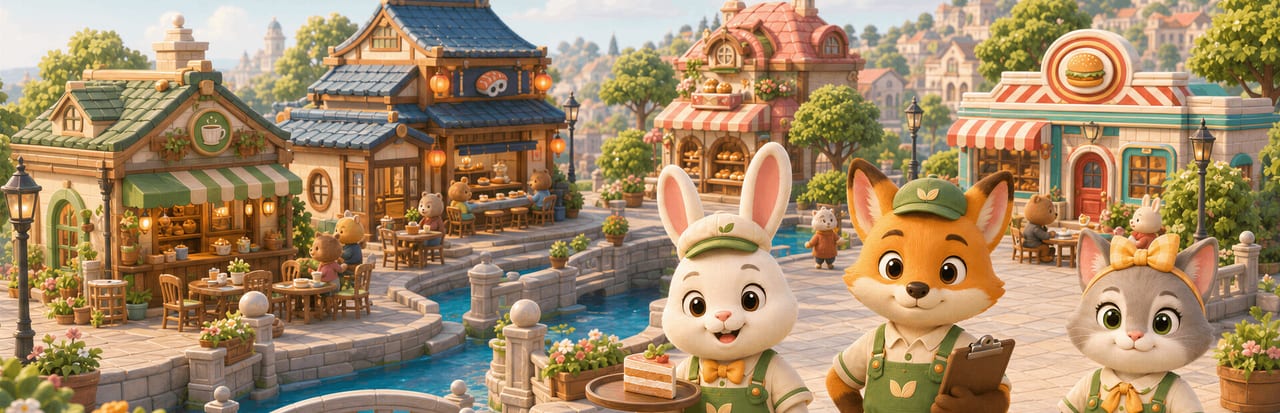
Tasty Chef is a cozy restaurant sim from Xpercent Games. You own the shop and you still walk the line. Steam lists a September 2026 window for the full Windows game (app 5019920). The full product is upcoming: no listed price, not a title you can purchase today. Steam published a free Milk Tea Shop demo on 5 September 2026 (app 5067140, about 1.10 GiB on disk). This overview is the one-page map of the game, the town, the modes, and this wiki. Official URLs sit on the links hub, the Steam page, and support.
It is not a Roblox experience. It is not a tap-only mobile cooker. Store footage is a 2.5D view of 3D kitchens with animal staff in aprons, a canal town, and tickets that you can steal with Take over. Generative AI was used in development for art and music, reviewed by the developer. Gameplay does not generate AI content.
What you actually do
A shift is a loop, not a stage:
- Stock crates and machines on the idle hub.
- Press Start Service.
- Tickets appear with a drink picture, a size such as S or L, and a timer.
- Build the cup: base (tea, matcha, or coconut), milk or lemon, then ice and toppings if the menu allows.
- Serve. Restock when Stock Alert fires. Take over an employee cup when a bar is dying.
- End Shift. Read gold, tips, bonus, and the star rating.
That loop is documented station-by-station in how to play and as a first-hour path in getting started. You can finish every cup yourself or assign animal employees. Duties include Take Orders, Make & Serve Drinks, and Restock Supplies — ranked on hiring staff and the staff roles list.
Milk tea drinks you can toggle in the demo: Milk Tea, Matcha Milk Tea, Lemon Black Tea, Coconut Milk. Toppings: Boba, Jelly, Red Bean, Coconut Jelly, Chia Seeds, Pudding, with a maximum of 0–3. Ice is Off or Custom. Plan those toggles on the menu planner and the recipes page.
Tasty Town map
The overworld is Tasty Town. Official shots and the demo map show a handful of named stops. Treat “Current Shop” as playable and “under construction” as announced.
- Milk Tea Shop — the starting business and the demo’s only working kitchen.
- Hiring Agency — recruit animal staff by rarity and wage.
- Style Boutique — outfits. Spend here after the line works, not before.
- Town Bank — gold and town funds later. It will not save a shift that cannot find milk.
- Bakery — under construction on the demo map. Do not plan day one around ovens.
- Sushi Restaurant — under construction in the demo, with store screenshots of a conveyor pit for later.
Store copy also mentions pizzerias on the demo page and burger key art elsewhere. Until a building is selectable as Current Shop on your map, it is preview, not a kitchen you can staff. Compare venues on restaurant types.
Modes of play
Steam lists single-player, co-op, and online multiplayer. You can:
- Run the shop alone and finish every ticket yourself (solo).
- Run it alone with NPC staff and only Take over dying cups.
- Invite friends and split stations (co-op).
Build Mode is the remodel layer: Grid (G), Equipment Info (H), Kitchen / Inventory / Decor tabs, Undo / Redo / Reset / Store All. Placement checklists live on kitchen layout and the kitchen flow planner. Partial controller support is listed; Steam Deck is Unknown. Specs and those caveats live on system requirements and controls.
Steam Cloud is listed. Family Sharing is listed as a store category; the game is unreleased, so sharing does not apply yet. Do not tell a household they can share a copy nobody can buy.
Languages (game versus wiki)
The full game store table currently lists twelve interface languages: English, Simplified Chinese, French, Italian, German, Indonesian, Japanese, Korean, Portuguese (Portugal), Russian, Traditional Chinese, and Vietnamese. The demo listing also includes Spanish, Portuguese (Brazil), and Thai. Do not promise in-game Spanish for the full game as confirmed. This wiki ships English, French, German, and Spanish pages. Wiki language is not the in-game table.
How to use this wiki
English is the root path. Other languages use prefixes such as /fr/ and /de/. You do not need to type those prefixes in source links; this overview just tells you they exist. Every page URL on the site uses a trailing slash.
Read in this order if you are new:
- This overview (you are here).
- Getting started — first hub screen and first purchases.
- How to play — ticket construction.
- Demo and playtest plus demo notes and store status — what the slice will not give you.
- Menu planner and kitchen flow — decisions before gold.
- Hiring staff when you are tired of walking every cup.
- Release date when someone asks “when does it come out?”
Hub indexes if you already know the job: guides, tier-list, players, tools, updates, links.
This wiki is fan-made. Steam wins if a sentence here and a sentence on the store disagree. Send corrections through support. We will not invent YouTube videos, keybinds the game has not shown, or a price. We will not write as if the full game is on sale. Milk tea is the front door. The town is the promise. Play the door first.
Frequently Asked Questions
Quick answers for milk tea shifts, staff, and the September 2026 launch.
What kind of game is Tasty Chef?
A Steam Windows restaurant sim from Xpercent Games. You cook and manage, starting with a milk tea shop, with online co-op listed.
What is on the Tasty Town map?
Milk Tea Shop, Hiring Agency, Style Boutique, Town Bank, plus Bakery and Sushi Restaurant marked under construction in the demo.
Which wiki page should I open after this overview?
Open getting started if you have not run a shift, or the Steam page if you still need the demo URL.
Is the full game sold yet?
No. It is upcoming with a planned September 2026 window and no listed price. Steam published a milk tea demo in September 2026.