Tasty Chef Controls
Confirmed Build Mode keys, mouse play, and what Steam still lists as partial.
Tasty Chef is a top-down kitchen. Most of the shift is point, walk, and interact. This page only records controls that official Steam text or screenshots actually show. We will not invent a full WASD table and pretend it is a manual. When the in-game settings screen publishes a bind list, that screen wins.
If you are still learning tickets, keep how to play open. Layout-specific clicks belong with kitchen layout.
Confirmed Build Mode shortcuts
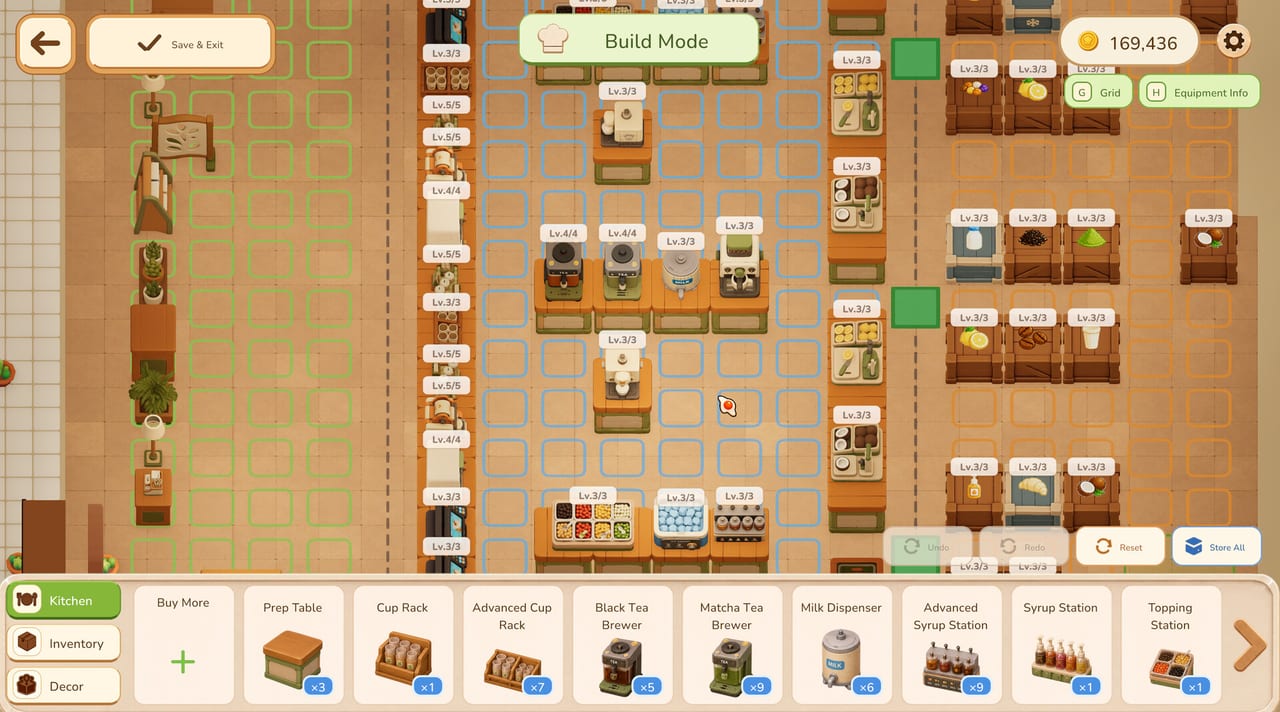
Official Build Mode shots label two toggles in the top-right:
- G — Grid. Turns the floor tiles on so you can snap machines to the walk path.
- H — Equipment Info. Shows machine overlays so you can see levels such as Lv.3/3 or Lv.5/5 without guessing.
Those two keys are the only letter binds visible in store screenshots. Use them every time you remodel. A kitchen that looks cute with the grid off is often a trap with the grid on: two tiles of wasted walking between the milk dispenser and the ice chest.
Build Mode also exposes on-screen buttons rather than secret keys:
- Save & Exit
- Undo / Redo / Reset
- Store All (packs machines back into the catalogue)
- Reclaim Mode (sushi layout shot)
- Buy More plus the Kitchen / Inventory / Decor tabs
- Layout Plans dropdown (sushi shot shows Layout 1 Active)
Click those. Do not assume they share a keyboard chord until the game says so.
Mouse and keyboard during a shift
Store footage is a 2.5D view of a 3D shop. You move a chef, face a machine, and interact. Tickets along the top are clickable; Take over is a button on the ticket, not a hidden hotkey in the screenshots. Start Service, End Shift, Staff, Recruit, Menu, Layout, Ingredients, and Equipment are all UI buttons on the hub.
Until Xpercent Games publishes a bind list, play with mouse and keyboard and keep a hand free for G and H when you duck into Build Mode. If a friend is on a controller, give them a station that is one interact loop (ice, or topping) rather than the full brew-to-serve chain. Station split is covered in co-op.
Controller and accessibility
Steam lists Partial Controller Support and Xbox controllers as a category, not as a verified full map. That means a pad may move and interact, not that every Build Mode toggle has a face-button clone. Test your pad in the demo before you promise a couch session. Camera Comfort, Custom Volume Controls, Adjustable Difficulty, and Save Anytime are listed as accessibility / quality-of-life features. Use them. This is a cozy game; you are allowed to lower the heat.
Steam Deck compatibility is still Unknown on the store page. Do not buy a Deck solely for Tasty Chef until Valve or the developer posts a result. The system requirements page stays the PC checklist.
Suggested personal binds (not official)
If the settings menu lets you remap later, this is a sane wish-list, clearly marked as opinion:
- Interact / pick up / place on a near key (E or left mouse).
- Cancel / drop on right mouse or Q.
- Staff panel on one button you can hit without opening Town.
- Push-to-talk if you use Steam overlay in co-op.
We will replace this wish-list with a real table when a screenshot or patch note shows it. For now, treat in-game Settings as canon.
UI reading is part of control
A lot of “I cannot find the key” is actually “I cannot find the panel.”
- Left hub: Town, Staff, Recruit, Abilities.
- Right hub: Layout, Ingredients, Equipment, Menu.
- Tickets: drink art, size S/L, timer, Take over.
- Stock Alert: crate problem, not a control bug.
- Shop Team vs Reserve on the staff board: assigned versus benched.
If a button does nothing, you may be in service when the action is hub-only (or the reverse). End Shift, change the layout, then Start Service again. That rhythm is the real control scheme.
Teaching a new player in five minutes
- Camera: scroll around the milk tea line until they see cups, tea, milk, ice.
- Ticket: click one ticket, walk the line, serve.
- Take over: steal one employee cup and finish it.
- Build Mode: press G, move one machine one tile, Save & Exit.
- Duty board: set Restock Supplies to 3 so they see a crate get filled without them.
If they like that loop, send them to getting started. If they want sushi belts early, send them to the demo page so they are not disappointed. Controls will not unlock bakery for them.
Troubleshooting input
- Cursor gone in Build Mode: click the game window once; overlay might have stolen focus.
- Controller moves but cannot open Menu: that is what “partial” support feels like — keep a mouse nearby.
- Grid will not appear: you are in service, not Build Mode. Open Layout.
- Friend cannot click your tickets: you are not in a co-op session, or they spawned in Town. Return to co-op.
When the developer publishes a full keymap, this page will quote it. Until then, G, H, mouse, and the on-screen hub are the honest Tasty Chef controls.
Frequently Asked Questions
Quick answers for milk tea shifts, staff, and the September 2026 launch.
What keyboard shortcuts does Tasty Chef show in screenshots?
Build Mode labels G for Grid and H for Equipment Info. Other actions appear as on-screen buttons.
Does Tasty Chef support controllers?
Steam lists partial controller support. Expect movement and simple interacts; keep a mouse for Build Mode.
Is Tasty Chef verified on Steam Deck?
No. Steam Deck compatibility is listed as Unknown. Check Steam before you rely on a handheld.
Where do I remap keys?
Use the in-game settings gear. This wiki does not invent a full bind table the store pages have not shown.