
Tasty Chef Staff and Players
Animal employees, solo shifts, and co-op station rules.
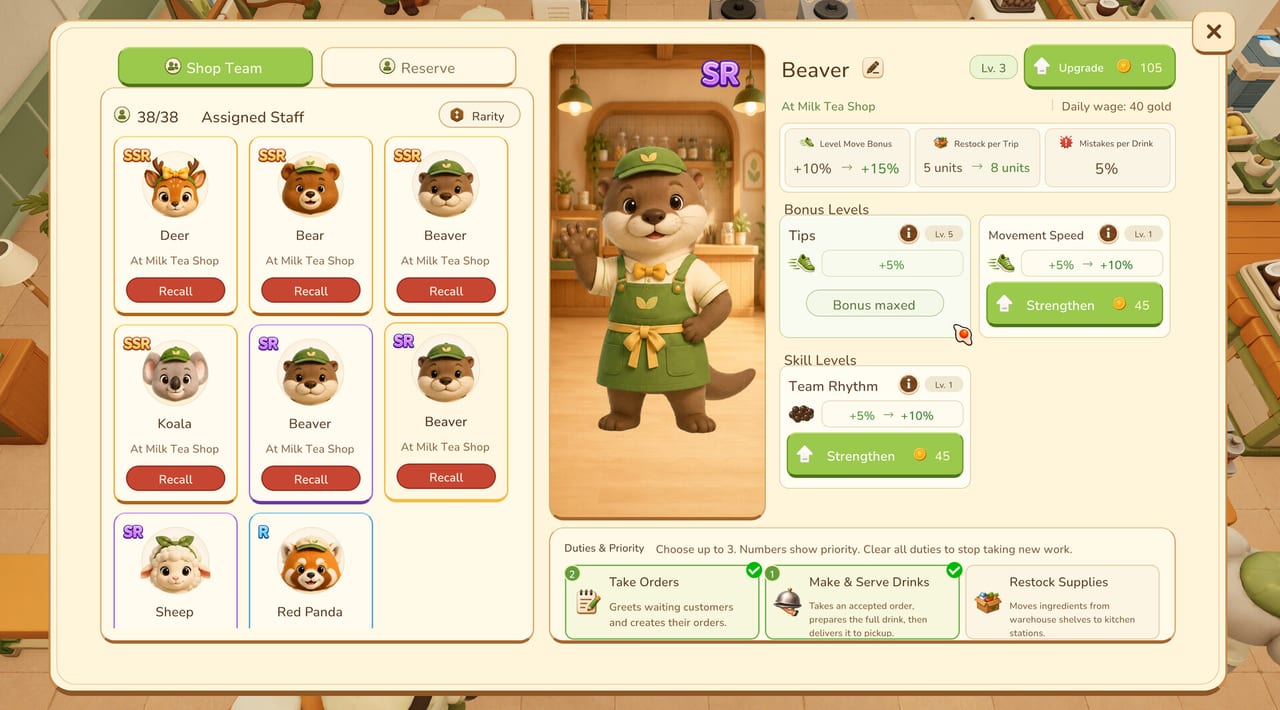
This hub is the people layer of Tasty Chef: you, your friends, and the animal employees who walk the milk tea line. Xpercent Games is targeting a September 2026 Steam launch on Windows. Until that window, treat the milk tea shop — and the free demo that teaches it — as the place you learn who should greet, who should brew, and who should restock.
Three pages sit under this hub. Hiring staff is the roster manual: rarities, wages, numbered duties, Shop Team versus Reserve, and Recall. Co-op multiplayer is the human-team manual: station splits, Take over etiquette, and kitchens wide enough for two bodies. Solo play is the owner-operator manual: run every cup yourself, or lean on NPC staff without turning into a spectator.
If you still need the ticket loop, step out to how to play and getting started. This category assumes you can finish a Milk Tea and want to know who else is allowed to touch the cup.
Who stands on the floor
You are both owner and cook. Steam lists single-player, co-op, and online multiplayer. You can complete a shift with no employees, with a small Shop Team of animal staff, or with friends on the same floor. Partial controller support is listed; mouse and keyboard remain the safe default, as the controls guide records.
Staff are animals in shop uniforms, not silent decorations. Official shots and store art show Deer, Bear, Beaver, Koala, Sheep, Red Panda, plus cats, raccoons, and penguins. They carry rarity tags R, SR, and SSR. Those tags sit next to a daily wage (screenshots show values such as 40 gold), an upgrade cost, and a short stat block. Confirmed stat labels include Level Move Bonus, Restock per Trip, Mistakes per Drink, Tips, Movement Speed, and Team Rhythm. This wiki does not invent extra abilities or pretend a Deer always outruns a Koala. Read the card in front of you.
Shop Team, Reserve, and the 38/38 trap
The staff board splits the roster into Shop Team and Reserve. Shop Team works the current restaurant. Reserve sits on the bench until you assign them. Recall pulls someone off the floor when they are wandering, overlapping a station, or costing a wage you cannot justify. Assigned 38/38 appears in a late screenshot. That number is a late-shop ceiling, not a starter quest. A new milk tea line wants one greeter and one drink maker, not a crowd that cannot pass the ice chest.
Recruiting happens from the hub’s Staff and Recruit panels and from the Hiring Agency on Tasty Town. Appearance changes live at the Style Boutique. Gold can move through the Town Bank into town funds. None of those town buildings replace a duty list. Hire first, dress later.
Three duties, numbered on purpose
You can set up to three duties per employee, with a priority number on each:
- Take Orders — greets waiting customers and creates tickets.
- Make & Serve Drinks — accepts an order, prepares the full drink, and delivers it.
- Restock Supplies — moves ingredients from warehouse shelves to kitchen stations.
If Make & Serve is 1 and Restock is unset, coconut crates die during a rush. If Restock is 1 and nobody greets, the dining room goes quiet. Rank the trio on hiring staff, then compare roles on the staff list. During service, employee tickets show a Take over button. Use it when a timer is dying, not as a default steal. Stock Alert is the restocker’s cue to walk the warehouse wall.
Solo, co-op, and the same kitchen physics
A solo owner can brew every cup. A solo manager can let NPCs brew and only steal the bad tickets. Co-op players should not share one Matcha Tea Brewer. Split brew versus ice and toppings, and leave a passing lane — the same aisle advice as kitchen layout and the kitchen flow planner. Demo store text also lists Cross-Platform Multiplayer; treat that as a Steam tag, not a promise about every device.
Tasty Chef is not a Roblox experience and it does not use redeem codes or script hubs. Wishlist and demo links sit on the Steam links page. Launch timing lives on the release date page. Demo limits live on the demo playtest guide and demo notes. Questions for the studio can go through support (contact@onepercentstudio.games).
How to use this hub
- Open hiring staff before you spend wages on a full bench.
- Open solo play if you are the only human in the shop.
- Open co-op before a friend joins, not after you both idle on the same brewer.
- Keep the guides hub nearby for tickets, and the tier list hub nearby when you compare restaurants, recipes, and roles.
The people layer only works if the floor is honest. Place machines on a walking line, keep the menu inside what you can stock, and let staff walk jobs you actually numbered.
Frequently Asked Questions
Quick answers for milk tea shifts, staff, and the September 2026 launch.
Can I play Tasty Chef without hiring staff?
Yes. You can run the whole shop yourself. Hire NPCs when tickets outrun your hands, as solo play explains.
What duties can animal staff take?
Up to three numbered duties: Take Orders, Make & Serve Drinks, and Restock Supplies. Details live on hiring staff.
Does Tasty Chef support co-op?
Steam lists co-op, online co-op, and multiplayer. Split brew versus ice instead of sharing one Matcha Tea Brewer. See co-op.
Is Tasty Chef a Roblox game with codes?
No. It is a Steam Windows game from Xpercent Games. Use the Steam links page, not a codes list.