Tasty Chef Guides
From the first cup to a full Tasty Town shift.
This hub is the practical path through Tasty Chef, the cozy restaurant sim from Xpercent Games. Steam lists a September 2026 window for the full game. Until then, most players should treat the milk tea shop as the classroom: learn a ticket, place machines, and decide when an animal employee should take over a cup.
Start with the getting started guide if you have not opened a shift yet. Then use how to play as a station-by-station walkthrough of brewing, icing, and topping. The demo and playtest page explains what the free Steam demo currently includes, and what it still hides behind “under construction” labels on the town map.
What these guides solve
Players search this wiki for a short list of pains. Tickets pile up because tea, milk, ice, and toppings sit too far apart. Gold disappears into extra machines that do not sit on the walking path. Staff keep making drinks nobody ordered because duties were never ranked. Friends join a session and stand on the same brewer. Each guide below answers one of those problems without padding.
Tasty Chef is not a Roblox experience and it is not a tap-only mobile cooker. You are on the floor with the team. You can grab a ticket yourself, or press Take over on an employee cup when the line is about to break. That hands-on loop is why the controls guide and the kitchen layout guide belong next to the beginner pages instead of in a separate dump of trivia.
Suggested reading order
- Getting started — wishlist, demo, first shift, HUD reading.
- How to play — drink construction, Take over, ending a shift.
- Demo and playtest — milk tea only, missing bakery and sushi.
- Controls — grid toggle, equipment info, controller support.
- Kitchen layout — Build Mode, walk paths, storage.
- Tasty Town — Hiring Agency, Style Boutique, Town Bank, under-construction pins.
- Milk tea shop — the Current Shop machine list and first purchases.
- Star ratings — Overall Rating, tips, when to End Shift.
- Style Boutique — Change Appearance after the line works.
- Ingredients and storage — crates, Stock Alert, Restock Supplies.
After those, jump sideways. The PC nav dropdown shows a subset and then View all — extra guides live on this hub. The restaurant types list compares Milk Tea, Sushi, and Bakery as they appear on Tasty Town. The recipes and menu page covers Milk Tea, Matcha Milk Tea, Lemon Black Tea, Coconut Milk, and the topping toggles. The staff roles list ranks Take Orders, Make & Serve Drinks, and Restock Supplies.
How a shift actually feels
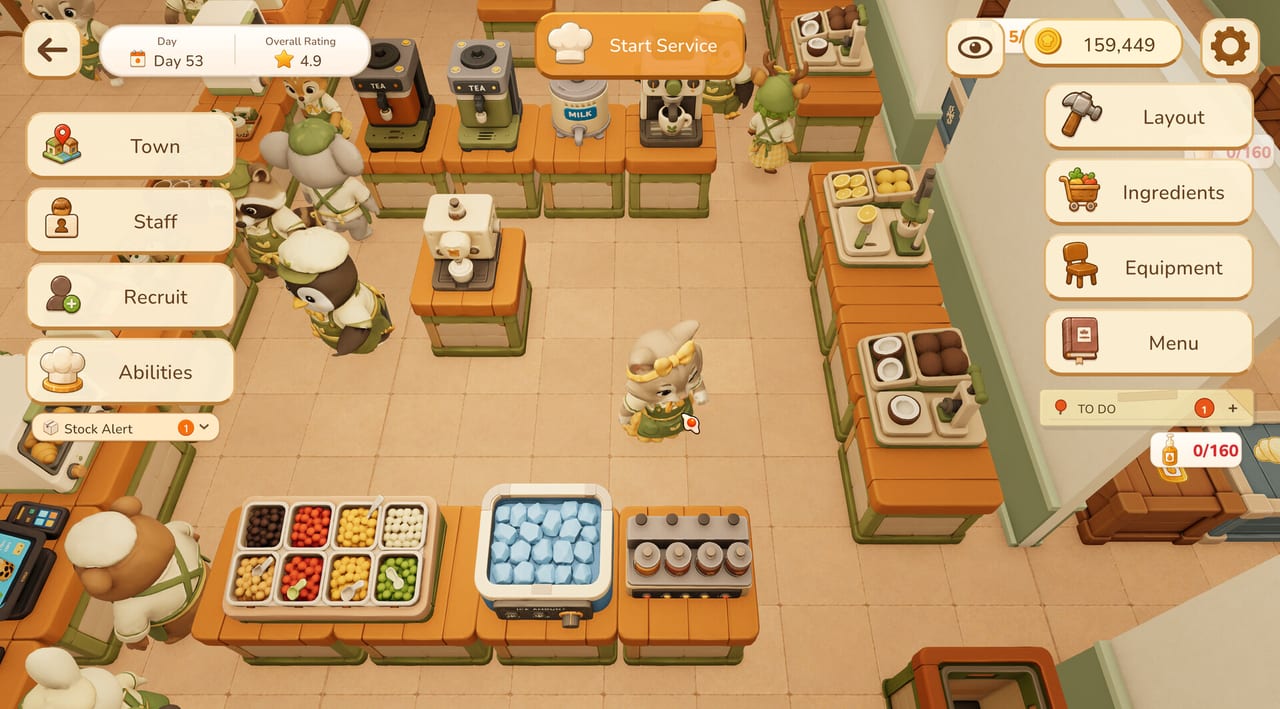
A typical milk tea service starts from the pause-style hub: Town, Staff, Recruit, Abilities on the left, Layout, Ingredients, Equipment, and Menu on the right. You press Start Service when the floor is stocked. Orders appear as tickets with a drink picture, a size such as S or L, and a Take over button. A Stock Alert pops when a crate is thin. Gold, Player Cups, and a Price Bonus sit in the corner so you can see whether the shift is paying for the next machine.
If the floor is quiet, you can brew every cup yourself. If it is loud, assign animal staff and only steal the tickets that are about to expire. That is the same advice we give on hiring staff and solo play. Co-op players should split stations instead of sharing one Black Tea Brewer — details live in the co-op guide.
Tools that sit next to the guides
Guides tell you what to do. Tools help you decide before you spend gold. Use the system requirements page before you buy a laptop for the demo. Use the menu planner before you enable every topping. Use the kitchen flow planner before you drag a tenth Matcha Tea Brewer into a dead corner.
Launch timing, demo notes, and store status live under updates and official links. If you only open one extra page after this hub, make it getting started.
Keep facts aligned
This wiki follows the Steam page and the official screenshots: milk tea as the opening shop, sushi conveyor kitchens, a bakery marked under construction, animal staff with rarity tags, and online co-op. We do not invent keybinds the game has not shown. When Steam changes the September 2026 window, the release date page is the first place we edit.
Frequently Asked Questions
Quick answers for milk tea shifts, staff, and the September 2026 launch.
Do I need the full game to use these Tasty Chef guides?
No. Most kitchen, menu, and staff advice applies to the milk tea demo. Bakery and sushi notes flag what is still under construction.
Which guide should a brand-new player open first?
Open Getting Started, then How to Play before you spend gold in Build Mode.
Are codes or scripts listed here?
No. Tasty Chef is a Steam game from Xpercent Games. Use the Steam links page for the store, demo, and playtest.
Where do layout and staff guides overlap?
Layout decides walking distance. Staff duties decide who walks. Read kitchen layout with hiring staff.