
Getting Started in Tasty Chef
Open the milk tea shop without wasting your first stack of gold.
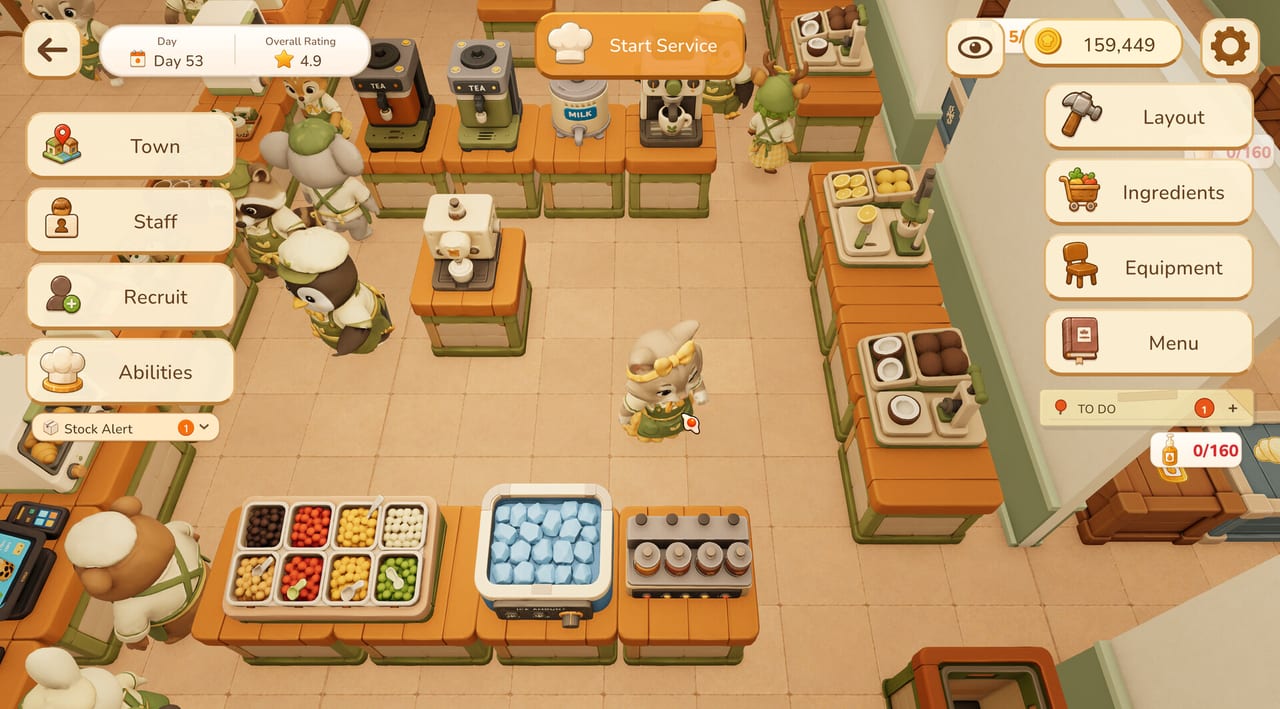
Tasty Chef is a cozy restaurant sim where you are both owner and line cook. Xpercent Games is targeting a September 2026 Steam launch on Windows. Your first hour should not be a shopping spree. It should be one clean milk tea shift: stock crates, place a short brewing line, learn a ticket, then decide whether you or an animal employee finishes the cup.
This page is the onboarding path. Pair it with how to play once tickets start stacking, and with the demo and playtest guide if you are still deciding whether to download the free Steam demo.
Before you press Start Service
Wishlist the full game on Steam, then install the demo if you want hands-on practice. The demo is the Milk Tea Shop only. On the Tasty Town map, Bakery and Sushi Restaurant show as under construction, so do not plan your first hour around conveyor sushi. Official store links sit on the Steam links page.
Minimum PC numbers from Steam are modest: a 64-bit Windows machine, Intel i5-9500T or Ryzen 5 2600H, 4 GB RAM, GTX 660 or RX 460, and 3 GB of disk. Recommended specs jump to 8 GB RAM and an RTX 2060 / RX 5700 class GPU. Confirm the latest list on the system requirements page before you buy hardware just for the demo.
Read the hub screen
When a shop is idle you will see a top-down kitchen with two tool columns. Left: Town, Staff, Recruit, Abilities. Right: Layout, Ingredients, Equipment, Menu. Gold and a star rating sit in the corners. A Stock Alert appears when a crate is running low. That hub is your planning room. Do not mash Start Service until ice, cups, tea, and milk are actually on the floor.
Town sends you to Tasty Town, the overworld with the Milk Tea Shop, Hiring Agency, Style Boutique, Town Bank, Bakery, and Sushi Restaurant. Staff and Recruit open the employee boards described in hiring staff. Layout and Equipment open Build Mode. Menu opens the drink toggles covered by the menu planner.
Your first purchases
You do not need every machine. A working milk tea line is:
- Cup rack within one step of the first brewer.
- Black Tea Brewer and Matcha Tea Brewer on the same table run.
- Milk dispenser beside those brewers, not across the room.
- Ice bin and topping station at the end of the line, because ice and toppings finish the cup.
- Ingredient crates (tea, milk, lemon, coconut, pastry extras) along a wall the restocker can hug.
Build Mode uses a grid. Toggle Grid with G and Equipment Info with H, as noted in the controls guide. Undo, Redo, Reset, and Store All exist if you make a mess. Save & Exit when the walking path is a straight corridor, not a maze.
First shift checklist
- Set a short drink menu. Milk Tea and Matcha Milk Tea are enough. Lemon Black Tea and Coconut Milk can wait. See recipes.
- Limit toppings. Boba, jelly, red bean, coconut jelly, chia seeds, and pudding can all be enabled, but a maximum of one or two toppings per cup is kinder to new hands.
- Assign at most two staff duties. Take Orders plus Make & Serve Drinks is a sane pair. Restock Supplies is the third duty when crates start flashing.
- Press Start Service. Watch the first three tickets. If an employee is already brewing, let them finish unless the ticket is stalling — then use Take over.
- End the shift when the rating and gold make sense, not when you panic. A 4.9 overall rating in screenshots is the kind of number you want to protect, not chase with a bloated menu.
How tickets work on day one
Tickets show a drink, a size such as S or L, and a progress bar. Employee tickets also show a Take over button. Taking over is not a failure. It is how you unstick a station. If five tickets are live and you keep grabbing the same brewer as a deer employee, you will both idle. Split: you handle ice and toppings, they handle tea and milk, or the reverse. That split is the same advice we give for co-op even when you are playing solo with NPCs.
Gold, wages, and the bank
Staff have a daily wage (screenshots show values such as 40 gold) and upgrade costs. Do not hire a full Shop Team of 38 on day one. Hire the rarity you can afford, set three duties with a numbered priority, and recall anyone who is wandering. Extra gold can move through the Town Bank later. Early gold is for cups, ice, and one extra brewer in the walking path — not for decorating the Style Boutique.
What “success” looks like after an hour
You can brew Milk Tea without thinking. You know where ice lives. You can explain Take Orders versus Restock Supplies. You have not unlocked sushi, and you should not pretend you have. Next reads: how to play for the full ticket loop, kitchen layout for grid discipline, and restaurant types so you know what Tasty Town is saving for later.
If something in the demo disagrees with this page, trust the build you are holding and send a note through the support links. Pre-launch games move. This getting-started path stays useful as long as milk tea is the front door.
Frequently Asked Questions
Quick answers for milk tea shifts, staff, and the September 2026 launch.
Is Tasty Chef free to play?
The full game is a paid Steam title with a planned September 2026 launch. Steam also lists a free demo limited to the milk tea shop.
What should I buy first in the milk tea shop?
Cups, a tea brewer, milk, ice, and a topping station on one walking line. Skip extra decor until tickets stay green.
Can I open the sushi restaurant on day one?
Not in the current demo. The Tasty Town map marks Sushi Restaurant and Bakery as under construction. See restaurant types.
Should I hire staff immediately?
Hire one or two after you can finish a cup yourself. Then set duties on the hiring staff page.